
How It Works
Follow each step in Cards.
- Keep decisions and evidence with the Card they explain.
- Do not complete a Card simply to remove it from view.
- 01
Open a Card from Stack, Plan, Pressure, Calendar, or another Cards view.
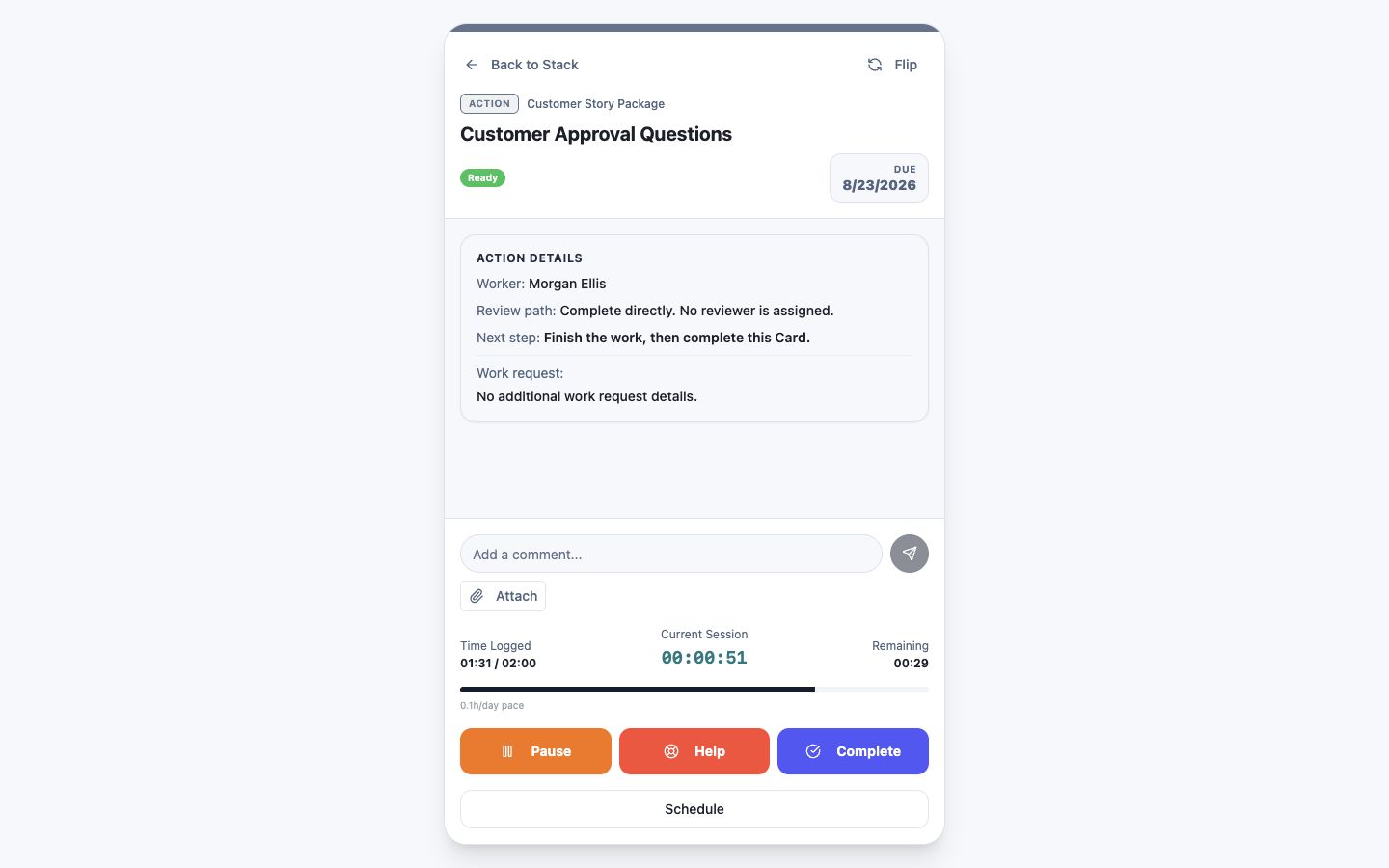 Open the selected Card
Step 1 screen focusOpen a Card from Stack, Plan, Pressure, Calendar, or another Cards view. - 02
Confirm the Card type, Project, status, owner, due date, and review path.
Confirm type, Project, status, owner, and timingStep 2 screen focusConfirm the Card type, Project, status, owner, due date, and review path. - 03
Read the work request, completion criteria, dependencies, and recent history.
Read the request, criteria, and historyStep 3 screen focusRead the work request, completion criteria, dependencies, and recent history. - 04
Add a relevant comment or attachment when the work changes.
Add a comment or attachmentStep 4 screen focusAdd a relevant comment or attachment when the work changes. - 05
Use the available action—such as Help, Complete, Review, or Schedule—only when its condition is true.
Choose the action that matches the work stateStep 5 screen focusUse the available action—such as Help, Complete, Review, or Schedule—only when its condition is true.